Nobody gets excited about stock control until the Saturday they sell the last one twice.
Then it becomes the most important feature in the shop, because you are emailing a customer to say the thing they bought does not exist, and no amount of good branding makes that email pleasant.
Stock problems are almost never carelessness. They are a gap between where stock actually is and where your shop thinks it is. Close that gap and most of the rest of your operational stress goes with it.
Everything, everywhere, in one table
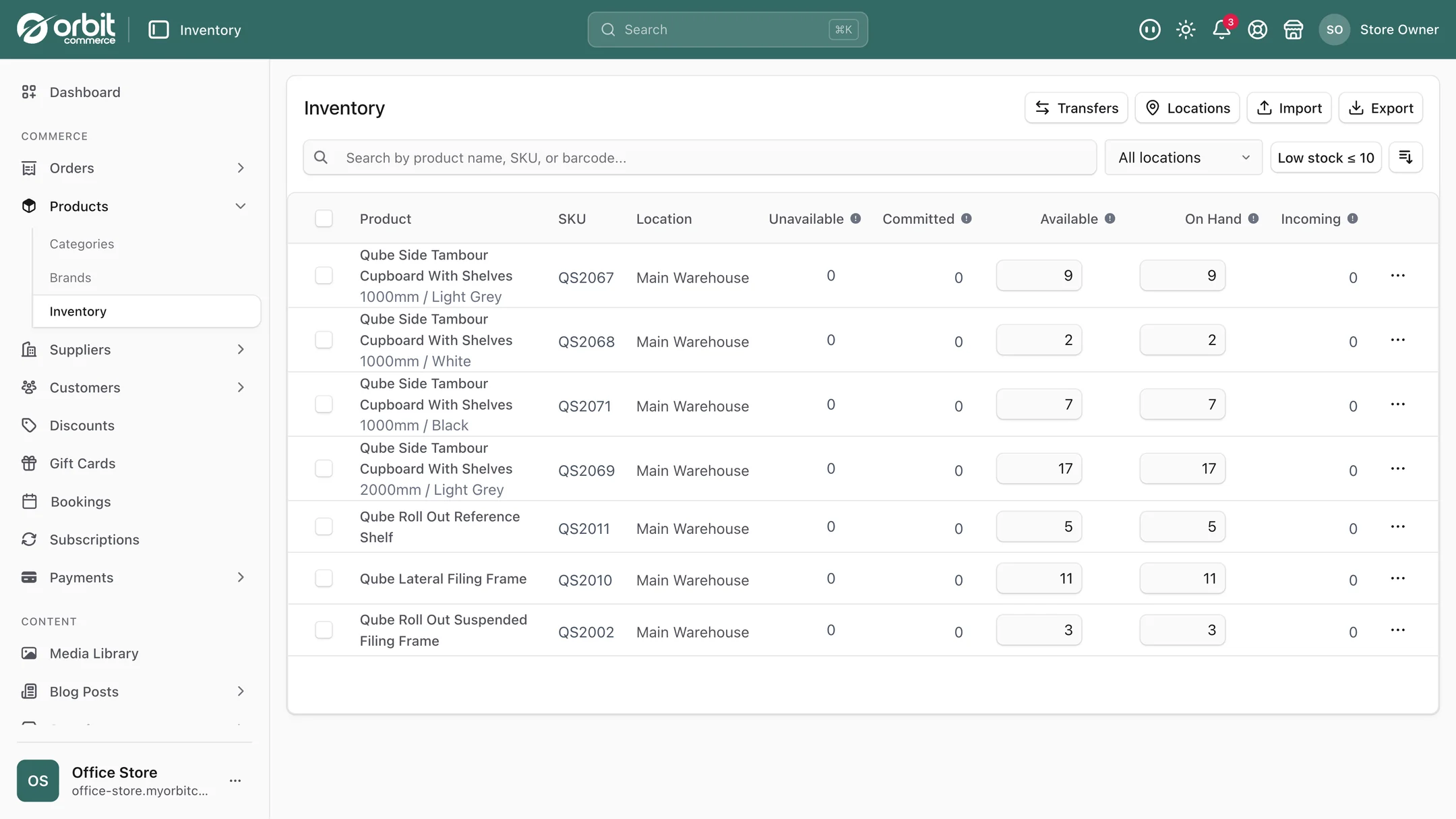
The core of it is a single table: every product, every variant, every location you hold stock. Not a report you generate. A screen you look at.
Locations are anywhere you keep things: a warehouse, a shop, a spare room, a market stall pitch, a fulfilment centre. You can have as many as you need, with no tier caps and nothing extra to pay for, and each one tracks independently. The forty units in the workshop and the twelve at the shop are separate numbers, because they are separate piles.
When stock moves between locations, you record a transfer, and both sides are updated together. That is the bit spreadsheets get wrong: somebody remembers to subtract from one column and forgets to add to the other, and from then on the totals are quietly fiction.
The five numbers on the stock table
The stock table gives every line five numbers, and understanding the difference between them is most of stock control.
| Number | What it means | Why it matters |
|---|---|---|
| On hand | Physically there right now | What a stocktake should find |
| Committed | Sold but not yet dispatched | Present in the room, already spoken for |
| Available | On hand minus committed | What you can actually sell today |
| Incoming | Ordered from a supplier, not arrived | Stops you panic-reordering |
| Unavailable | There, but not sellable: damaged, quarantined, held back | Keeps write-offs out of your sellable count |
The classic mistake is selling against on hand instead of available. Twelve on the shelf and nine already sold this morning means you have three to sell, not twelve. Getting that distinction right is the single biggest cause of overselling disappearing.
Two ways to change a number, and they are not the same
This sounds pedantic and it prevents a great deal of confusion.
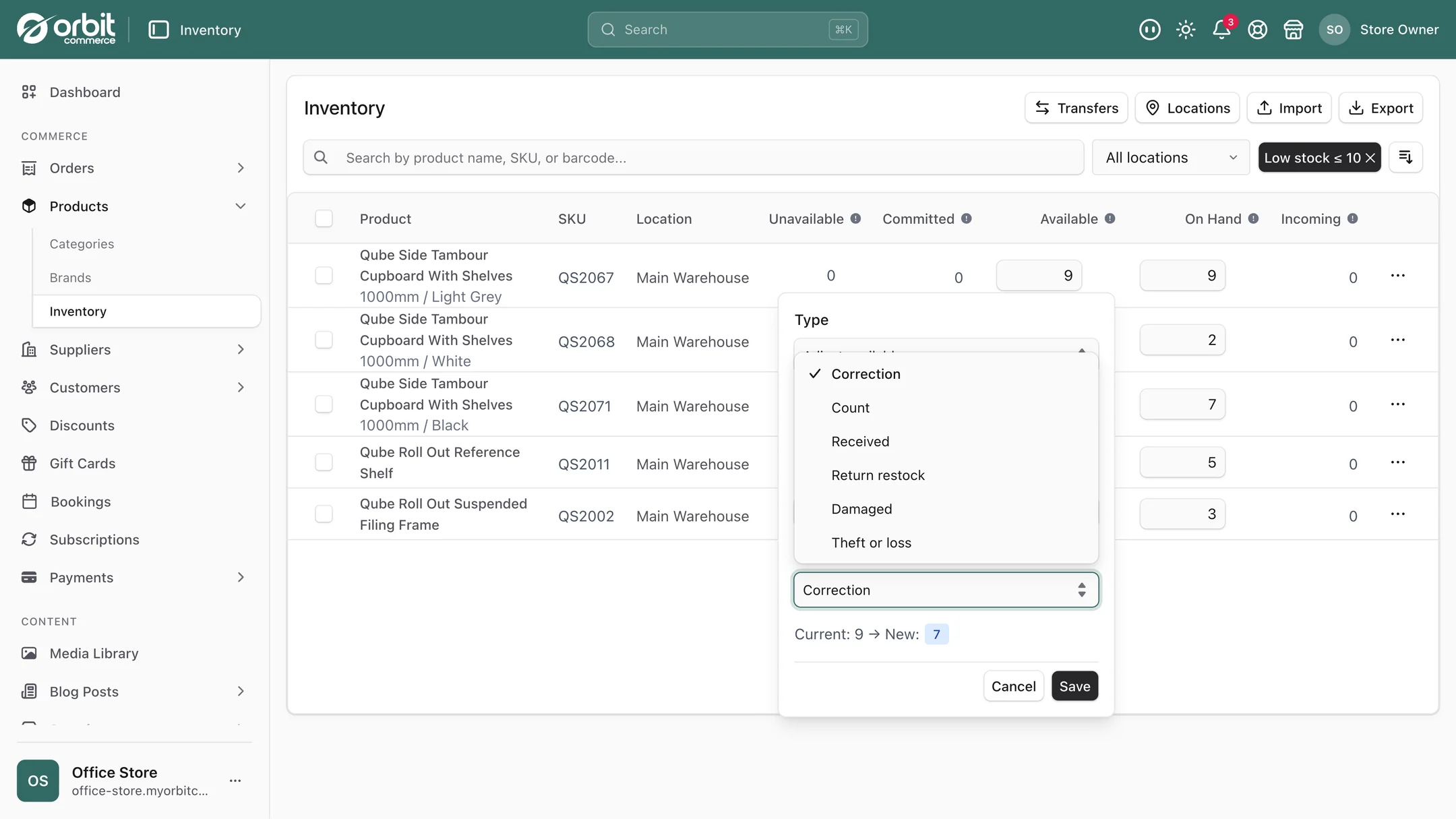
Adjust by an amount when something happened. A delivery arrived, so add 50. Two got broken, so subtract 2. You are recording an event.
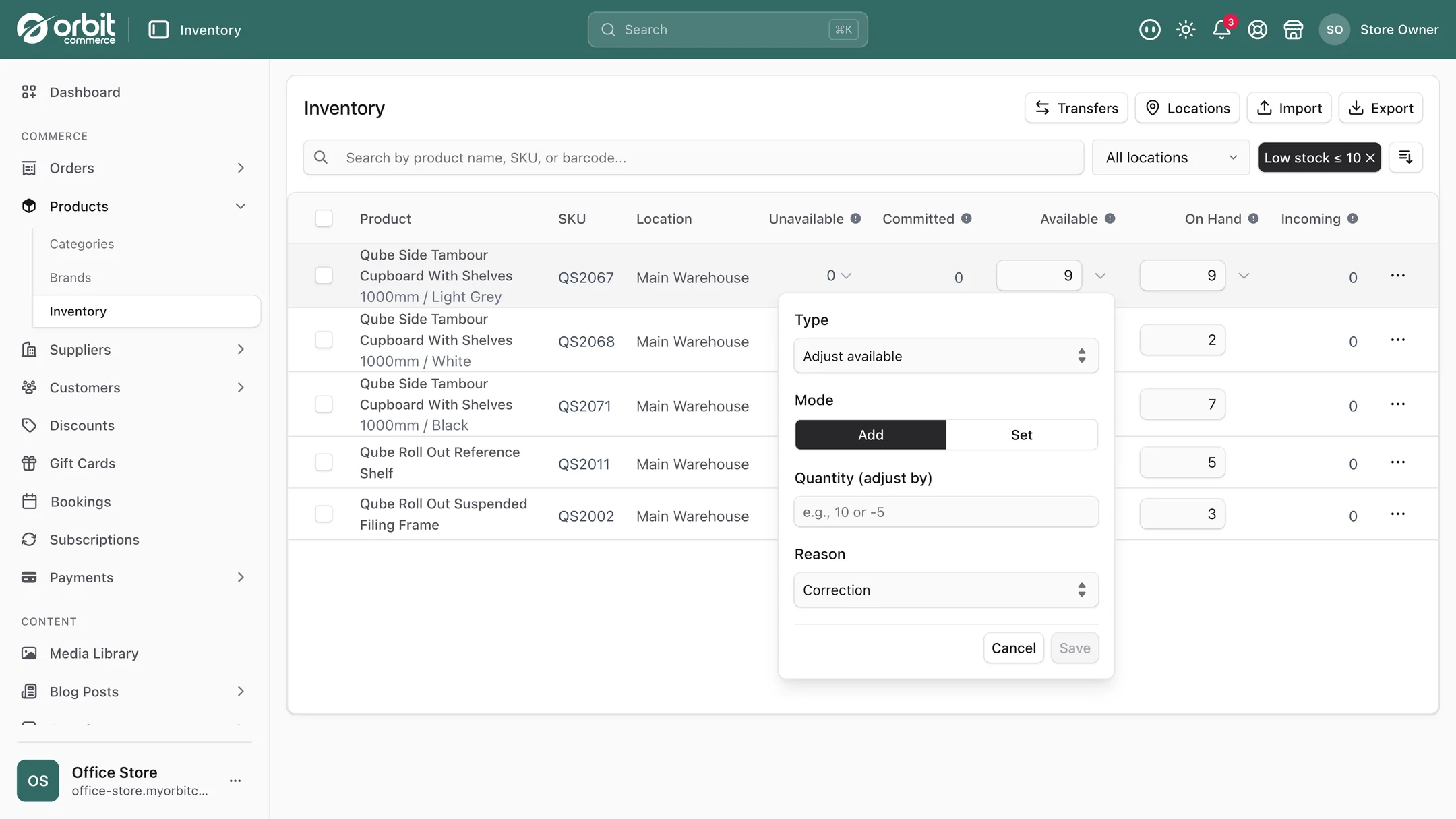
Set the absolute value when you have counted. After a stocktake the number is 47 regardless of what the system thought. You are asserting reality.
Use adjust for events and set for counts. Do it per product, per location, or in bulk when you have a lot to get through.
The movement history is the actual feature
Every adjustment and every transfer lands in a movement history. Any number in your shop can be traced back through the changes that produced it, with who made each one and when.
This is the difference between "we are eight units down and I have no idea why" and "we are eight units down, and here are the four events that did it". One of those is a mystery that recurs every quarter. The other is a problem you can fix, whether it is a miscount, a breakage nobody logged, or a process that needs tightening.
If you have more than one person touching stock, this stops being a nice-to-have. It is also what makes a stocktake reconcilable rather than an annual argument.
Getting data in and out
You can upload a CSV to update stock in bulk, and Orbit works out which of your columns is which rather than demanding a rigid template. That covers the three moments this actually matters: migrating from another platform, reconciling after a stocktake, and syncing with a warehouse system.
Export works the same way, whenever you want: product, SKU, location, on hand, available, incoming and committed. Useful for accounting, for insurance valuations, and for the annual conversation about how much money is sitting on shelves.
What good practice looks like
Count something every week, not everything every year. Pick your twenty fastest-moving lines and count them weekly. Annual full stocktakes find enormous unexplained differences long after the cause is knowable. Rolling counts find small ones while you can still work out what happened.
Record breakages the moment they happen. The dropped jar is a stock movement. If it only exists in someone's memory, it becomes an unexplained discrepancy in three months.
Make the market stall a location. If you sell at fairs, the box you take is a location, and stock transfers into it and back out. Otherwise every event produces a mystery.
Watch committed stock during a sale. A promotion can commit most of your stock in an hour while it is all still physically present. Available is the number that tells the truth.
Sell in more than one place carefully. If you sell on marketplaces too, syncing is what stops the same unit being sold twice. Our post on multichannel selling goes into it, and the Amazon and eBay plugins, which have a free tier with paid plans for bigger catalogues, push your stock to those marketplaces on a schedule.
Setting it up
- Add your real locations. Everywhere stock actually sits, including the spare room. A location you do not model is a location that leaks.
- Do one honest count and set absolute values. Start from truth rather than from what the old system claimed.
- Check the Low stock filter, which lists everything with 10 or fewer available, so reordering is prompted rather than remembered.
- Agree who adjusts stock and how. Two people with different habits produce numbers nobody trusts. Team roles are covered in team accounts and permissions.
- Put a weekly rolling count in the diary for your top twenty lines.
Good to know
Every number starts with a count. The table is only as right as the physical count behind it, so make the first count honest and keep the weekly rolling count going.
Planning ahead comes with Enterprise. Its operations tools read the last 28 days of sales against your stock, give every line the date it runs out, and turn what you need into purchase orders, which then show as incoming.
Bundles sell from their parts. A bundle has no stock of its own: each one sold takes its components from stock, so the set and its parts always agree. Ask us and we switch bundles on for your shop. For made-to-order work, decide early whether you track the parts or the finished product.
Questions people ask about stock control
Can I track stock in more than one location?
Yes, with as many locations as you need and no tier caps or paid add-ons. Warehouses, shops, pop-ups, fulfilment centres, even a market stall box. Each location tracks independently, and moving stock between them is recorded as a transfer with both sides updated together, which is exactly the step spreadsheets tend to get wrong.
What is the difference between on hand and available stock?
On hand is what is physically there. Committed is what has been sold but not yet dispatched, so it is still in the room but already spoken for. Available is on hand minus committed, and it is the number you can actually sell today. Selling against on hand rather than available is the most common cause of overselling, particularly during a promotion when stock commits faster than it ships.
How do I find out why a stock number is wrong?
Every adjustment and transfer is recorded in a movement history showing what changed, by how much, who did it and when. Rather than an unexplained shortfall, you get the sequence of events that produced the current number. This is what makes a stocktake reconcilable, and it matters as soon as more than one person touches stock.
Can I update stock in bulk after a stocktake?
Yes. Upload a CSV and Orbit detects your columns rather than requiring a fixed template, so you can reconcile a whole catalogue at once, migrate from another platform, or sync with a warehouse system. When you are recording a count rather than an event, set the absolute value rather than adjusting by an amount.
The short version
Model every place stock actually sits, including the awkward ones. Learn the difference between on hand and available, because that is where overselling comes from. Adjust for events, set absolute values for counts. Record breakages immediately. Count your top twenty lines weekly instead of everything annually. And when a number looks wrong, read the movement history rather than guessing.
What this saves you buying
On most platforms the things above arrive as separate paid apps. On Orbit they are part of the plan.
| What you would otherwise buy | The cost elsewhere |
|---|---|
| A multi-location inventory app | a monthly bill on top of your plan |
| A stock sync tool | another monthly bill |
| The stock spreadsheet | an afternoon a month, plus the overselling |