Every shop plans the sale. Almost nobody plans the return, so it gets handled in the inbox: a customer emails, you reply, they post it back at their own cost, it arrives eventually, you find the original order, you refund it, and three weeks later you cannot remember whether you did.
That is fine at two returns a week and quietly awful at twenty. It also throws away the single most useful piece of information in your business, which is why things come back.
How a return should actually flow
The customer starts it. A return request lands in your dashboard with the order attached, the specific items, and the reason they picked. You approve or decline it, with your reason recorded, without leaving the page.
That first detail matters more than it looks. When the customer initiates the request, the information arrives structured. When it starts as an email, somebody has to transcribe it, and somebody occasionally does not.
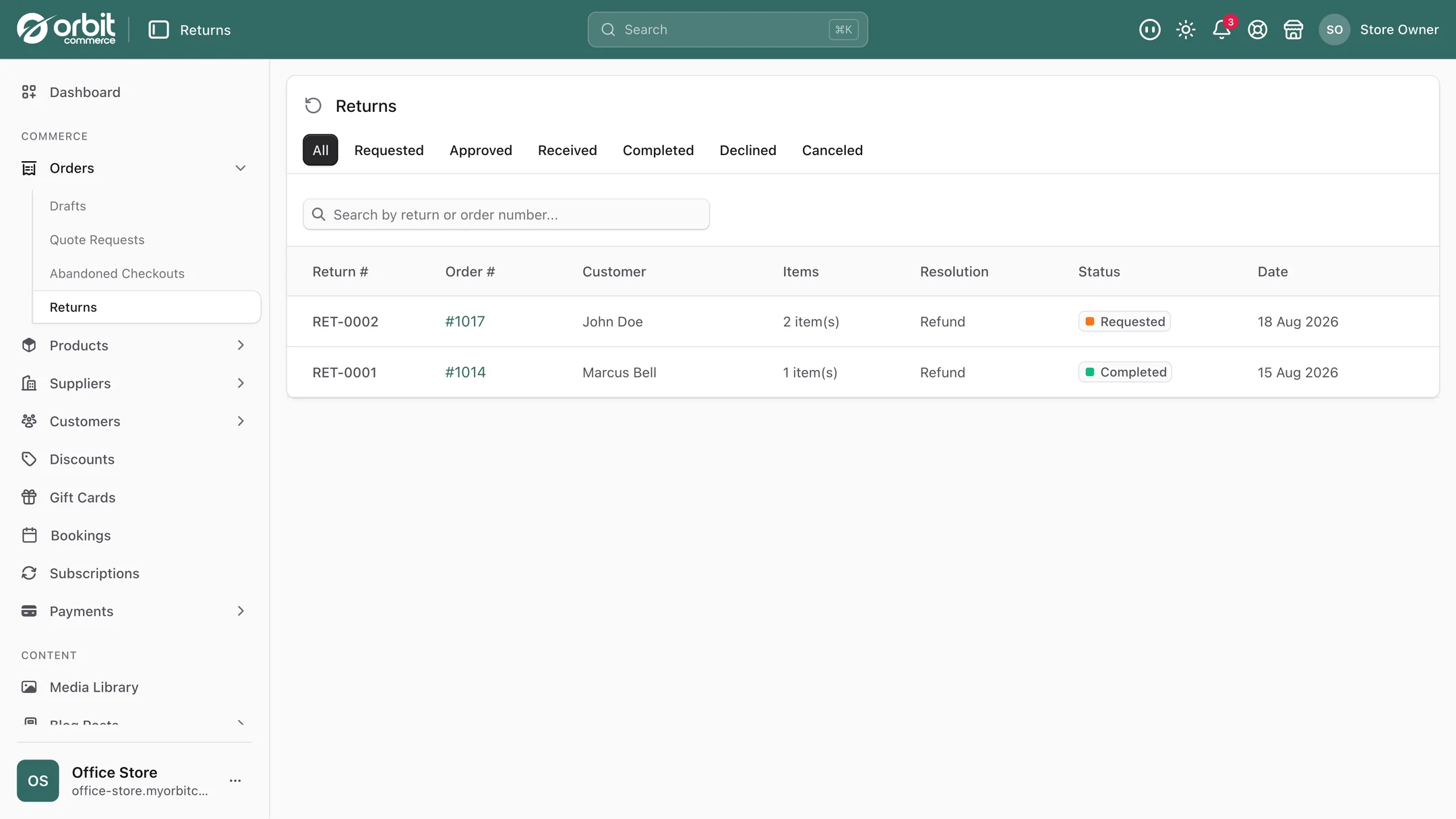
From there, every step sits on a timeline against the return: the request, your decision, the item arriving, the completion. When a customer rings up asking where their money is, the answer is one glance rather than an archaeology expedition through your inbox.
Reasons, and why they are the valuable bit
You set the list of reasons customers choose from, so it fits what you actually sell. Wrong size. Damaged in transit. Ordered the wrong colour. Not as described. Changed my mind.
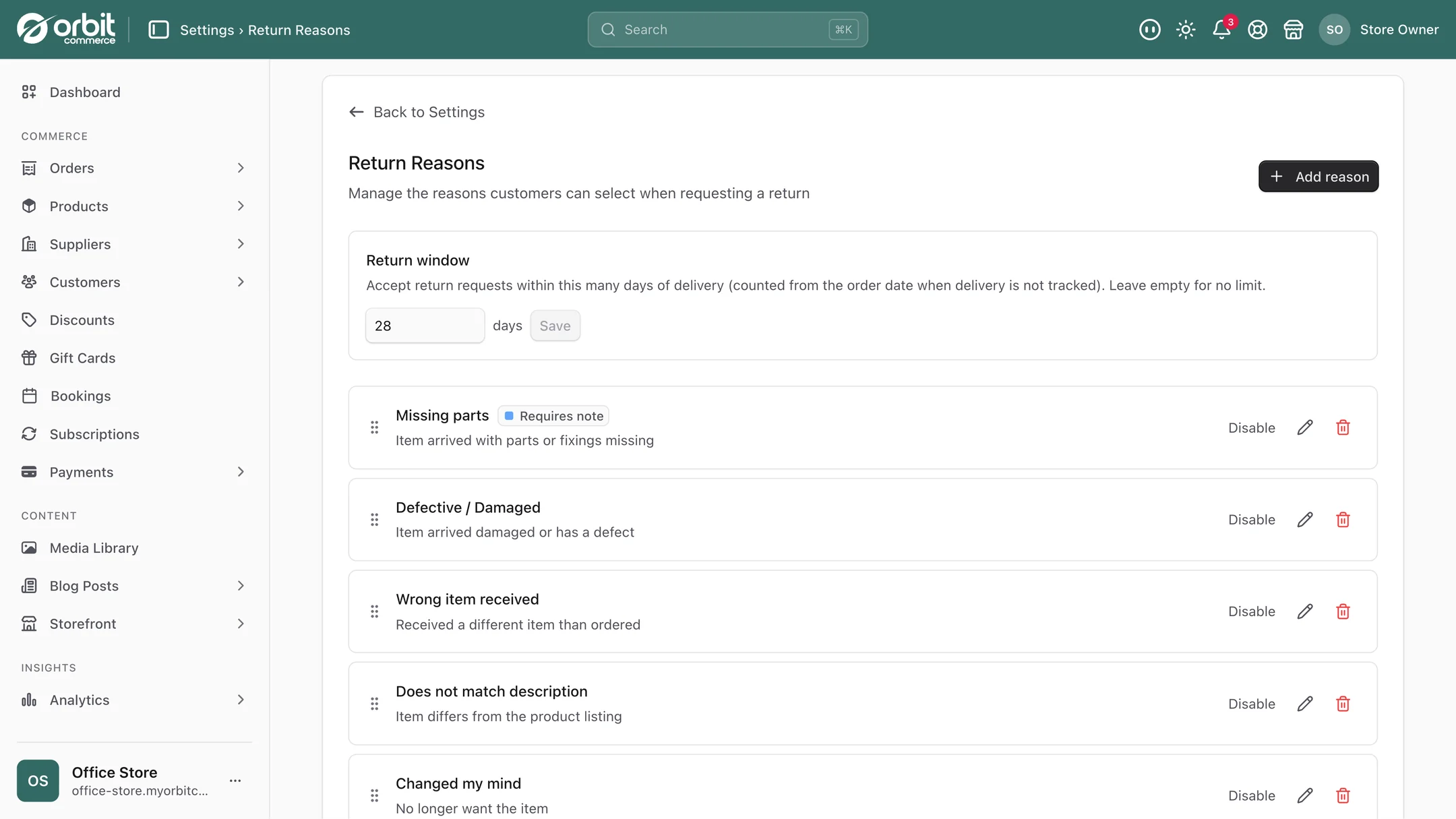
Then read the reasons across your returns, and that is where the money is. Individually a return is an annoyance. In aggregate they are the most honest product feedback you will ever get, and it is free.
- One product returned for "wrong size" far more than the others? It runs small. Add a note to the listing and a proper size guide, and watch the returns fall.
- A run of "damaged in transit"? Your packaging is losing an argument with a courier. Cheaper to fix the box than to keep refunding.
- "Not as described" clustering on one line? The photos are flattering it, or the description is overselling. Both are fixable in an afternoon.
None of that analysis is possible when reasons live as prose in an inbox.
Refund to the card, or keep the money
Two ways to settle it, and it is worth being deliberate about which you offer.
Back to the original payment method is what most people expect and what the law requires when the customer has the right to a refund. Complete the return, then issue the refund from the order's refund screen, and the record is stored against the order.
Store credit keeps the money in your shop as a future order rather than leaving for good. On Orbit you give it as a gift card issued by hand for the value, instead of the refund. Plenty of customers happily take it, particularly when the return was a sizing problem rather than a dissatisfaction, because they still want something from you. Offering a small bonus on credit over cash is a well-worn tactic and it works.
Be careful here though, and this is the important bit: store credit is something you offer, not something you impose. Where a customer has a legal right to a refund, credit cannot be forced on them. Our guide to what UK returns law actually requires covers where that line sits, and it is worth reading before you design your policy rather than after a complaint.
Prepaid labels, and why they pay for themselves
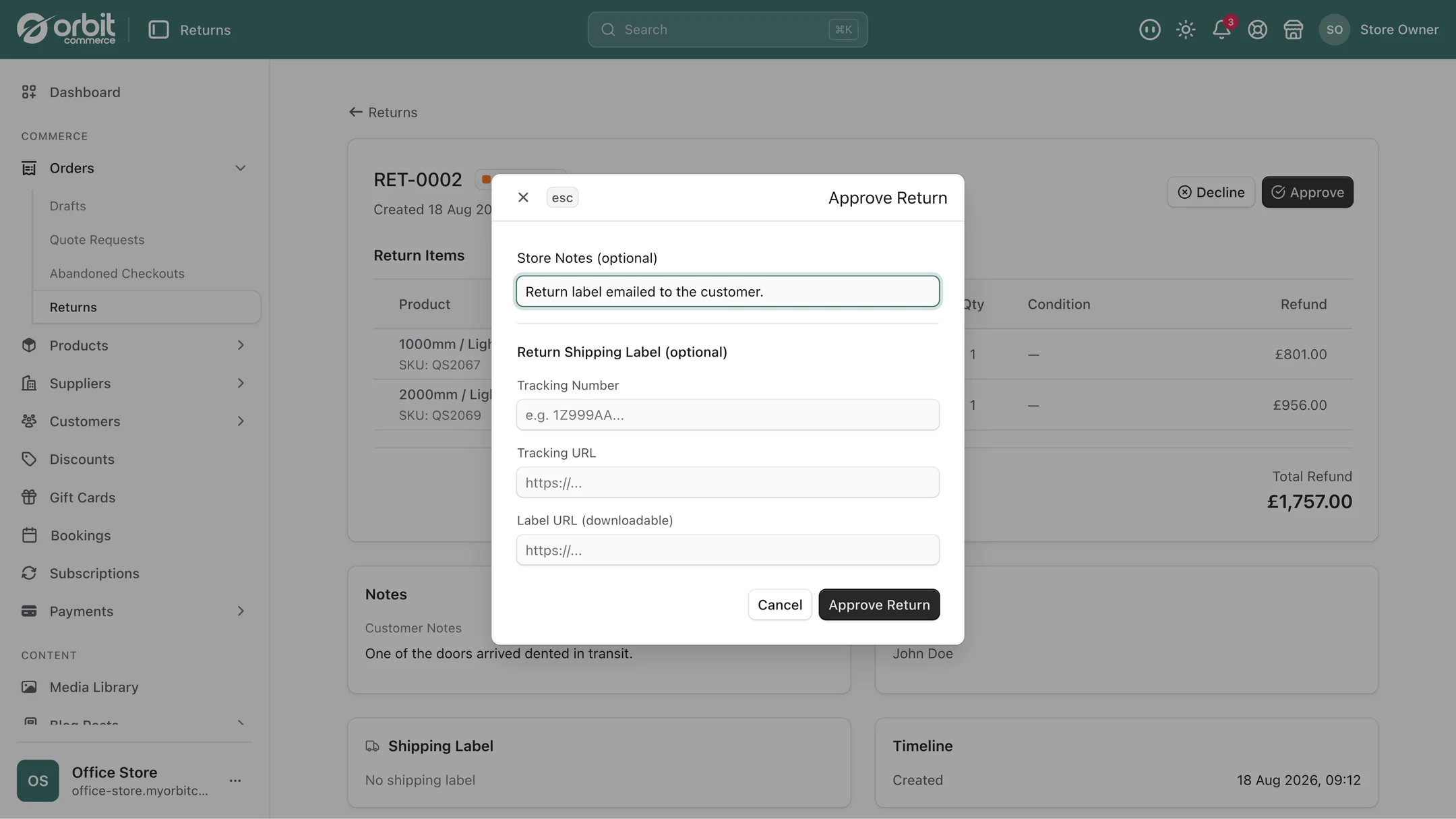
You can send the customer a prepaid return label instead of telling them to sort their own postage. Send them a label from your carrier, then add its tracking number, tracking link and label link when you approve the return, so everything about the parcel sits on the return. It feels like a cost. It usually is not.
Telling a customer to arrange their own return produces two bad outcomes: some of them give up, leave the item in the hall, and eventually leave a review about it, and some of them post it in a way that means it never arrives or arrives unidentifiable. Both are more expensive than a label. A return that arrives promptly, with a tracking number, in a condition you can resell, is worth considerably more than the postage.
Setting it up
- Write the policy first, and read the law before you write it. The software enforces whatever you decide, including the wrong thing.
- Set your reason list to match what you sell. Specific reasons produce useful data. A single "other" produces none.
- Decide your credit offer and whether you sweeten it, remembering it is an offer.
- Send prepaid labels at least for your higher-value items, where a lost return really hurts.
- Publish the policy where people look, which is the product page and the footer. A clear returns policy raises conversion, because it removes the risk of buying. It is also a hard requirement for free Google listings.
- Read the reasons monthly and fix the top one.
Good to know
Better listings mean fewer returns. Honest photos, real measurements and clear descriptions are what make returns rarer. The process makes each one cheaper and more informative, and the reasons tell you which listing to fix first.
The law sets the floor, not your policy. UK consumer rules give buyers cancellation rights on most distance selling regardless of what your page says, and a policy that contradicts them is unenforceable rather than clever.
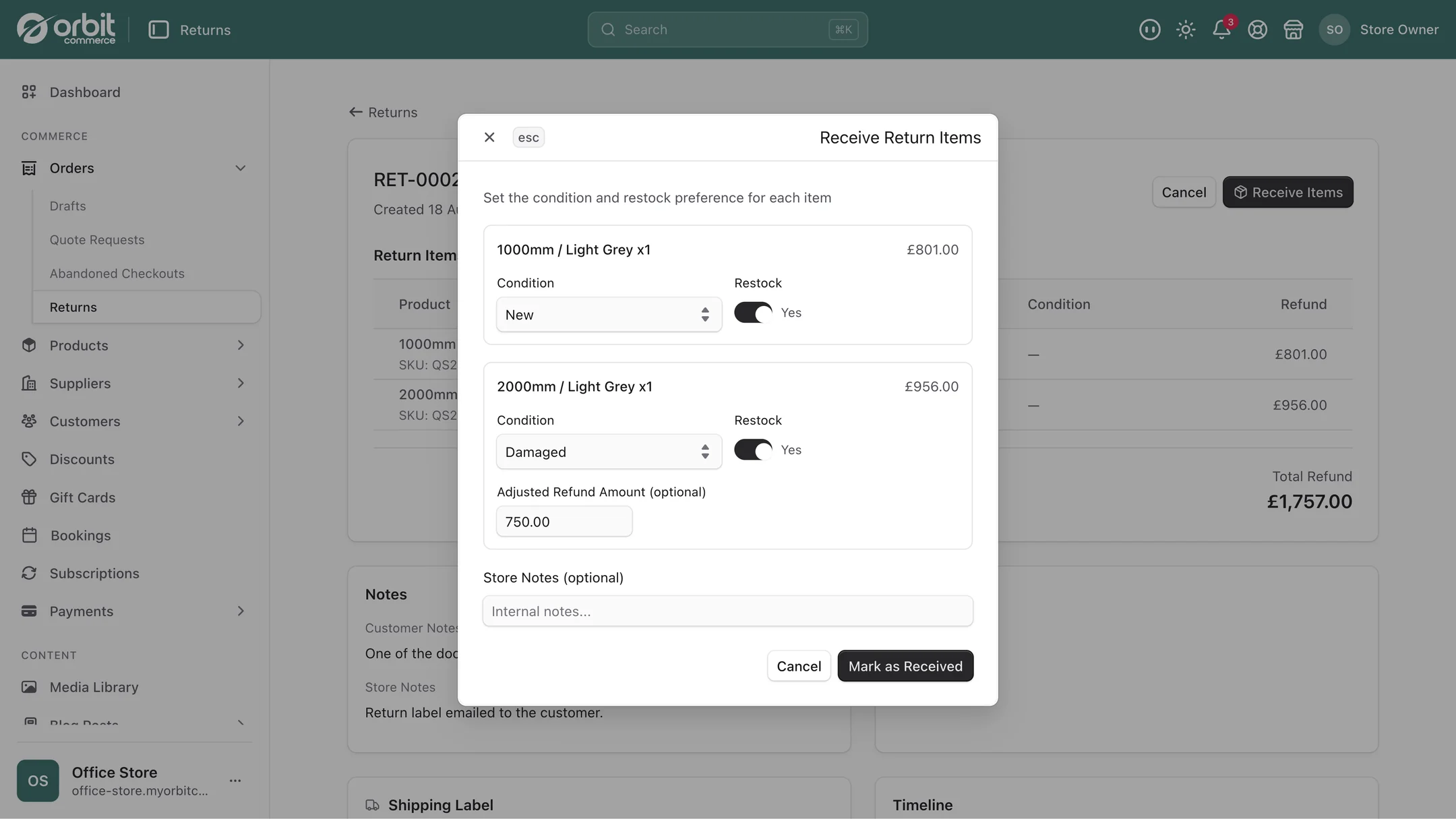
You decide what goes back on sale. When a return arrives, record each item's condition and send it to Restock, Quarantine or Write off. Restocked units go back on sale, and quarantined ones stay on the shelf but off sale. Decide who inspects, and what happens to the ones that fail, before it is a pile in the corner.
Questions people ask about returns
Can I offer store credit instead of a refund?
You can offer it, as a gift card issued by hand for the value, and many customers take it, particularly when the return was about sizing rather than dissatisfaction, because they still want something from you. The important caveat is that where a customer has a legal right to a refund under UK consumer law, store credit is an offer rather than a substitute, and it cannot be imposed.
Should I pay for return postage?
For most shops, yes, at least on higher-value items. Prepaid return labels look like a cost and usually are not, because the alternative produces returns that never get posted, arrive untracked, or arrive damaged and unsellable. A return that comes back promptly and resaleably is worth considerably more than the label, and it removes a common reason for poor reviews.
How can I reduce the number of returns I get?
Set specific return reasons, then read them in aggregate every month. Returns clustering on one product for wrong size means it runs small, which a note and a size guide fix. A run of damage in transit is a packaging problem. Not as described usually means the photos or the copy are overselling. The process itself does not reduce returns; acting on what the reasons tell you does.
Do I need a separate app to manage returns?
Not on Orbit. Return requests, approvals with recorded reasons, refunds from the order and the full return timeline sit in the same dashboard as your orders and customers. On most platforms returns management is a separate subscription stacked on the monthly plan.
The short version
Let customers start the return so the information arrives structured. Set reasons that fit what you sell and actually read them monthly, because that is where the money is. Offer store credit, do not impose it, and check the law before writing the policy. Pay for the label on anything valuable. Then fix the product listing that is generating the most returns, because that is the only thing that makes returns rarer.
What this saves you buying
On most platforms the things above arrive as separate paid apps. On Orbit they are part of the plan.
| What you would otherwise buy | The cost elsewhere |
|---|---|
| A returns management app | a monthly bill on top of your plan |
| The email thread and the shoebox of notes | your Monday mornings |