Most small brands fall into wholesale by accident. A shop emails asking about trade prices, you send a spreadsheet, they reply with what they want, you type it into your system as a manual order, raise an invoice in your accounting software, and thirty days later you work out whether they have paid.
It works, until it is six accounts. Then it is an afternoon a week, the price list has three versions in circulation, and you cannot remember whether the garden centre is on 30 days or 60.
The fix is not a second website. It is letting trade customers use your existing shop, while seeing entirely different prices.
How it fits together
Three pieces: the company, what they pay, and when they pay.
The company
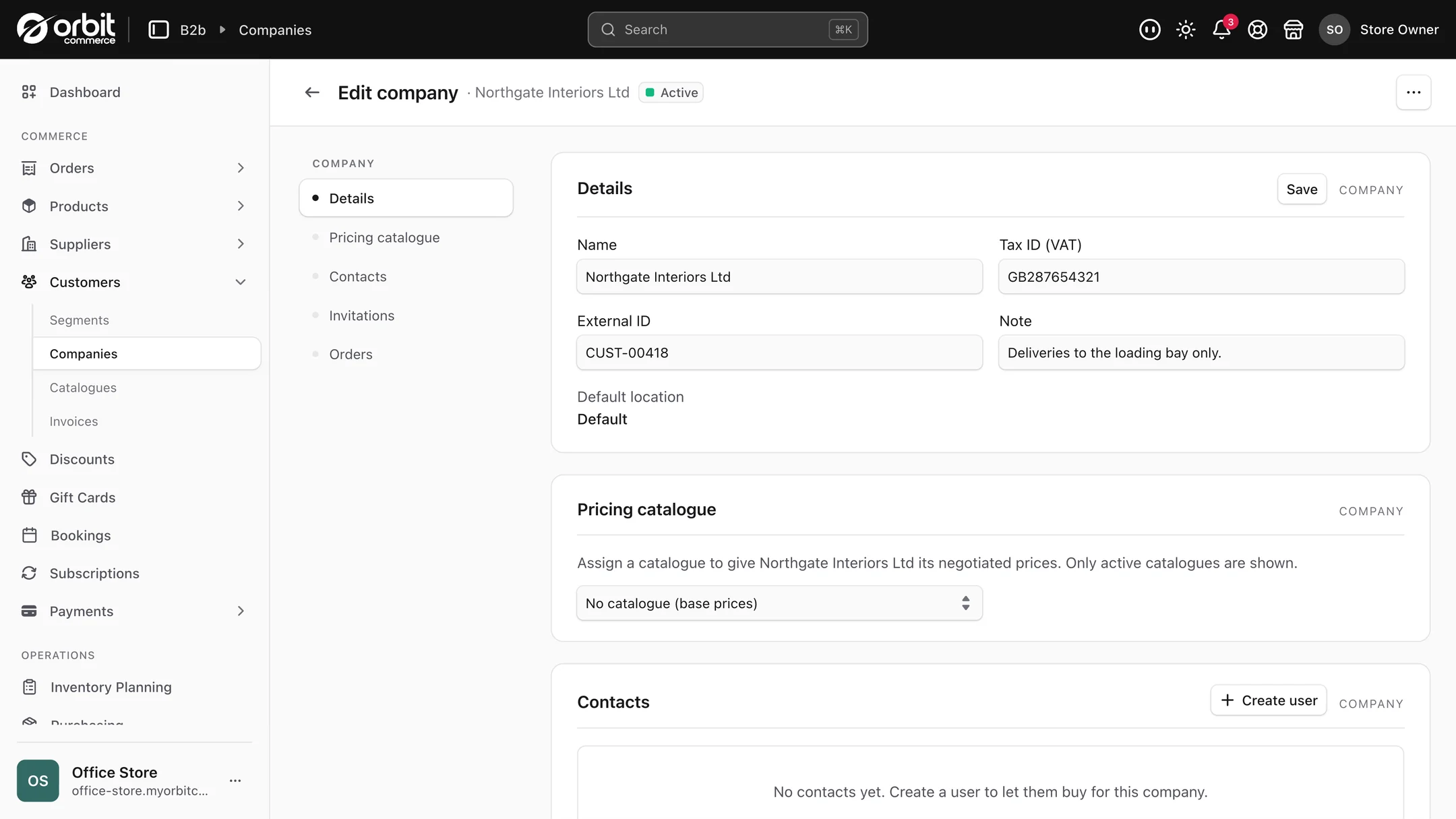
Each wholesale customer is set up as a company rather than a person. That matters, because a business is not one person. A company holds its VAT number and as many team members as it needs.
Team members get permissions, set from an Admin, Buyer or Viewer preset. Admins manage the account. Buyers just order. So the owner of a three-branch chain can have a buyer at each branch placing their own orders, without any of them being able to change the account.
What they pay
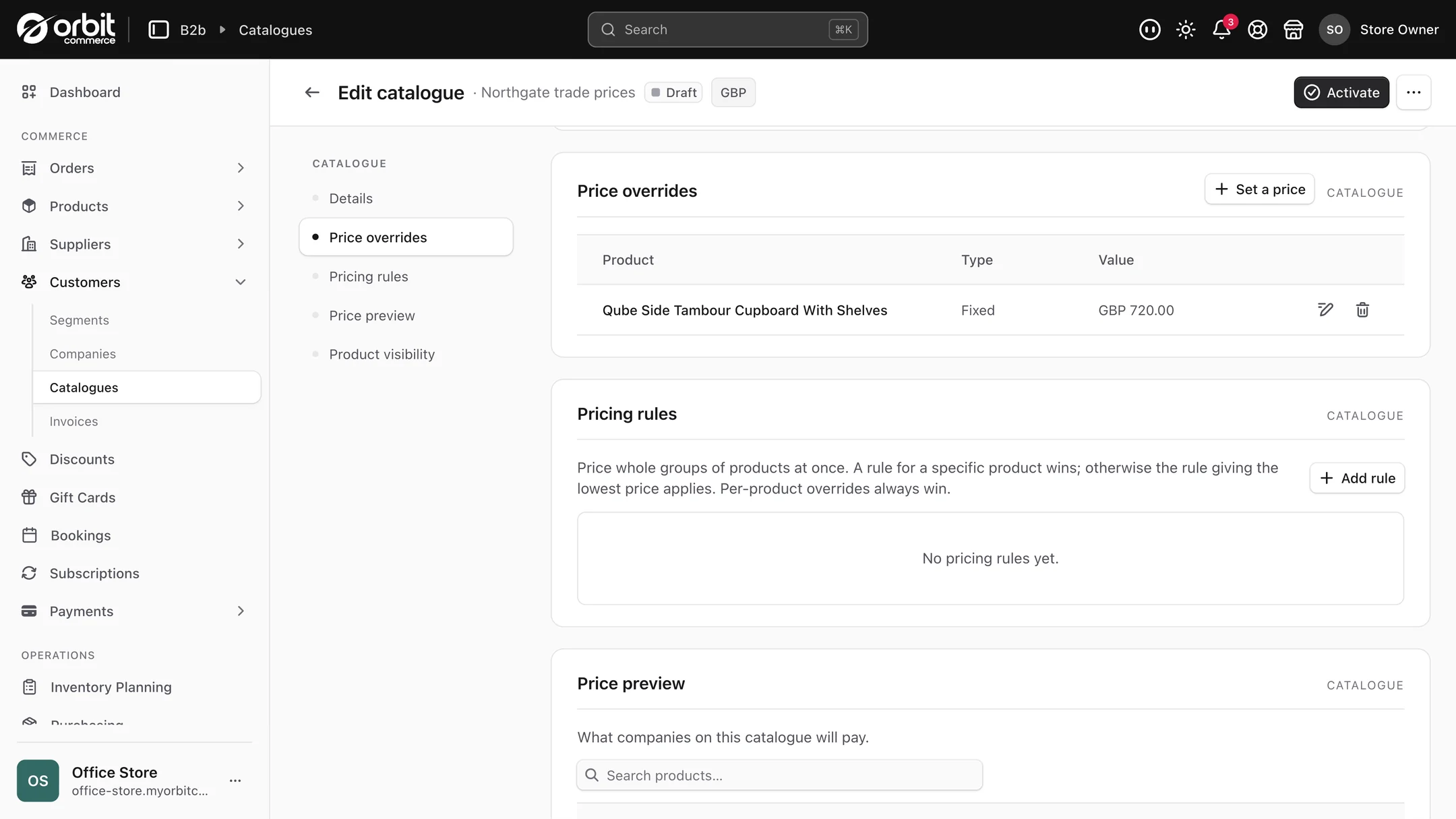
Trade prices live in price lists. A list can set a fixed price, or a percentage off your retail price, and it can work at the product level or right down to individual variants, because sometimes the 5 litre trades at a different discount from the 500ml.
You attach a list to a company. From then on, when their buyers log in, they see those prices. No code to type, nothing to remember to apply, no risk of a buyer being charged retail because someone forgot.
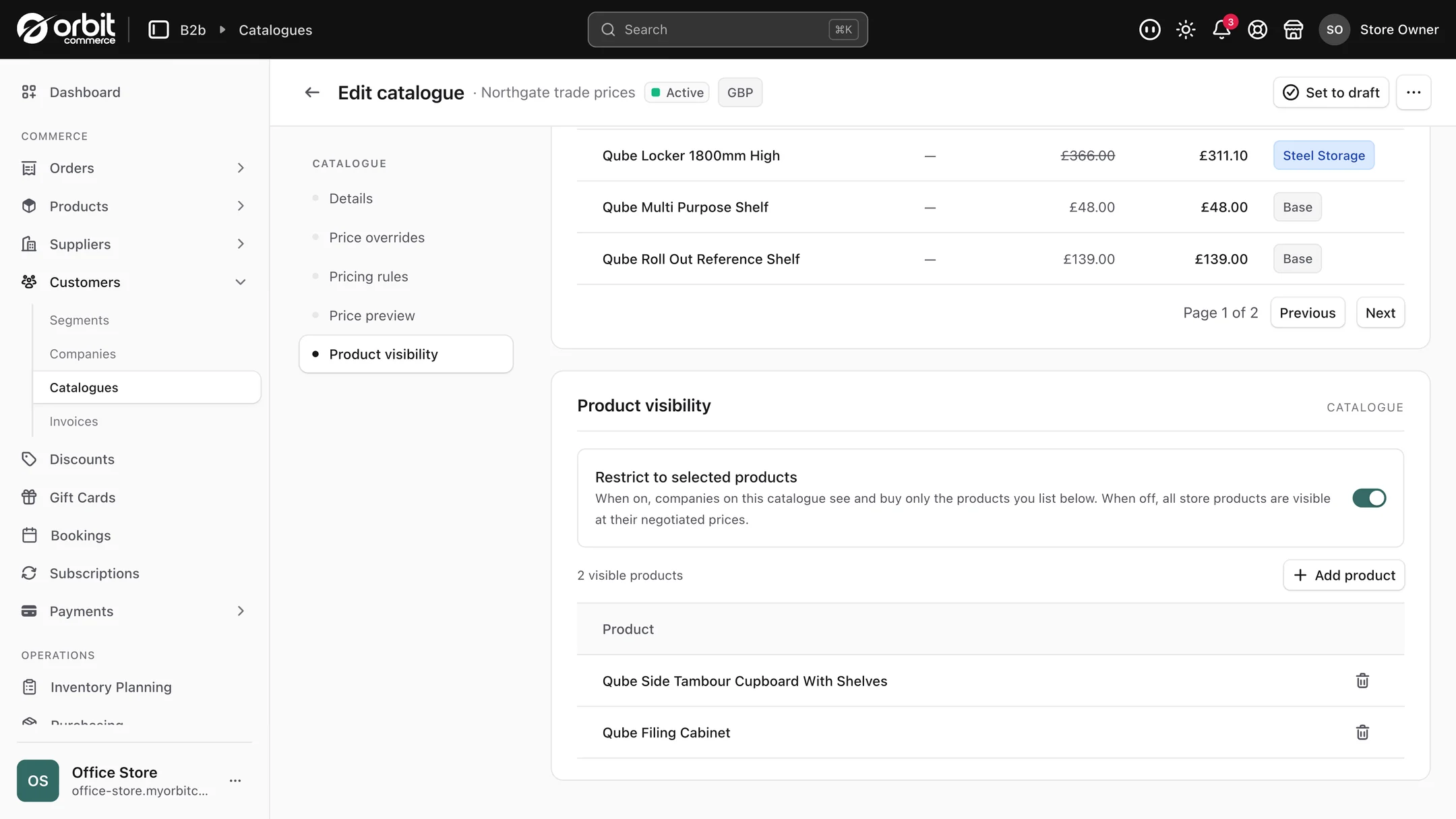
You can also restrict a list, so a particular range is only available to the accounts you want to have it. Useful when an exclusive is meant to stay exclusive.
When they pay
At checkout, when they order. Trade buyers pay at their company's prices, by card or by a manual method you offer, such as bank transfer, and their orders land in the same Orders screen as your retail ones.
What the buyer sees
They sign into your storefront like any other customer. Same shop, same product pages, same checkout. The difference is that the prices are theirs, and their account area shows their company's orders.
This is the bit that wins accounts. Buyers at small businesses are ordering from a dozen suppliers, and the ones they order from most are the ones where reordering takes ninety seconds at half past nine at night. A self-serve trade account beats a friendly email exchange, every time, on volume.
What this looks like in practice
A coffee roaster supplying twelve cafes. Each cafe is a company, on its own price list depending on volume. Cafe managers reorder themselves on a Sunday night.
A skincare brand selling to salons. Salons see trade prices, the public sees retail, on the same product pages. A restricted price list covers the professional-size products the public should not be buying at all.
Setting up your first trade account
- Create the company. Name, VAT number, and the team members who will order, each as an admin or a buyer.
- Build a price list. If you are starting out, a straight percentage off retail is the simplest thing that works. Move to fixed prices per product when you need finer control.
- Attach the list to the company so its buyers see those prices automatically.
- Invite the buyers. They set their own passwords and can order immediately.
- Watch the first order go through and check it looks the way you want before you onboard the next five accounts.
Two things worth pairing with this. Free delivery for trade accounts is a single shipping rule using a condition on the customer. And a trade account number stored as a custom field on the company keeps your accounting reconciliation simple.
Pricing it honestly
A word of caution that has nothing to do with software. Wholesale margin is thinner than retail margin, and the mistake most makers make is setting a trade price by taking a percentage off retail without checking the number underneath it still pays them. Our guide to pricing handmade products works through the maths, and the rule of thumb it lands on is that your retail price needs to be roughly double your wholesale price for both to work.
Get that wrong and better software just helps you lose money faster.
Good to know
It comes with Enterprise. Company accounts and trade price lists are part of the Enterprise plan, so start your free trial on Enterprise to set up your first trade account.
Your ERP can stay in charge. If you run one, it can create and update companies through the API using its own reference for each, and webhooks tell it whenever a company, one of its buyers or a price list changes.
Questions people ask about wholesale accounts
Can I show different prices to wholesale customers on the same shop?
Yes, and that is the core of it. You build a trade price list, either a fixed price or a percentage off retail, at product or variant level, and attach it to a company. When that company's buyers log in they see their prices automatically on your normal storefront. The public sees retail on the same pages. There is no separate trade site and nothing for a buyer to type in.
How do trade buyers pay?
At checkout, when they order, at their company's prices, by card or by a manual method you offer, such as bank transfer. The order lands in the same Orders screen as your retail orders.
Can one company have several buyers with different permissions?
Yes. A company can have as many team members as it needs, each set as an admin or a buyer. Admins manage the account, buyers just place orders.
Do I need a separate platform for B2B?
Not on Orbit. Company accounts and trade price lists are part of the Enterprise plan, and trade buyers use the same storefront as everyone else. Elsewhere this usually means a separate wholesale app, or a second B2B storefront to pay for and run.
The short version
Set each trade customer up as a company with its own buyers, and give it a price list. The buyers get to reorder at half nine at night without emailing anyone, which is what actually grows the account. Just check your wholesale prices still pay you before you send the invites.
What this saves you buying
On most platforms the things above arrive as separate paid apps. On Orbit they are part of the plan.
| What you would otherwise buy | The cost elsewhere |
|---|---|
| A wholesale or trade pricing app | a monthly bill on top of your plan |
| A separate B2B storefront | a second platform to pay for and run |