Here is a problem almost every shop owner recognises. You sell candles. Every candle has a burn time, a wax type, a scent family and a jar size. Buyers ask about all four before they buy. But your shop software gives you a title, a description, a price and maybe a weight, so those four details end up crammed into the description as a paragraph of text.
Which means: you cannot let people filter by scent family, you cannot show burn time in a neat table, half your products say "approx 45 hours" and the other half say "45hrs", and when you want to update the wax supplier across 60 products you are opening 60 descriptions and editing them by hand.
Custom fields fix that. You invent the boxes your business actually needs, and from then on every product has them, in the same place, in the same format.
What a custom field actually is
Think of the product page in your dashboard as a form. It comes with boxes everyone needs: name, price, photos, stock. A custom field is a box you add to that form yourself, and you decide what it is called and what kind of information goes in it.
You set it up once. From then on it appears on every product, so it gets filled in consistently instead of being remembered differently each time. That consistency is the whole point. A detail stored properly can be shown in a table, filtered on, used in a rule, or exported. The same detail buried in a paragraph can only be read.
You can add them to more than products
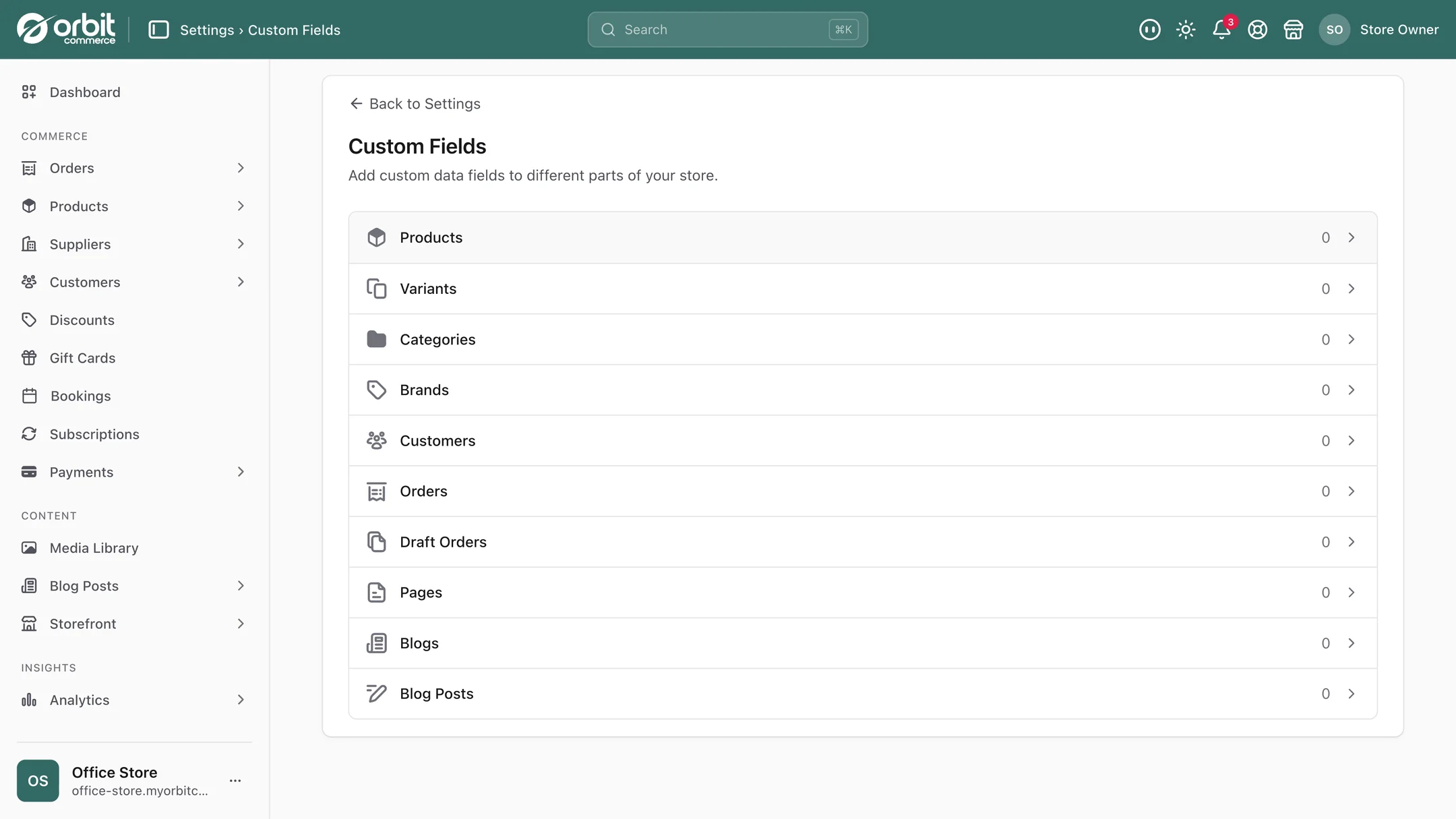
This is the part people miss. Custom fields are not only for products. You can attach them to:
- Products and individual variants, so a size 8 can carry a different measurement from a size 14.
- Categories and brands, so a whole range can carry shared information without repeating it.
- Orders and draft orders, which is where delivery notes, gift messages and job numbers belong.
- Customers, for trade account numbers, dietary requirements, or how they found you.
- Pages and blog posts, for things like a reading time or an author credit.
The kinds of box you can make
You are not limited to plain text, and choosing the right kind matters, because it decides what the box will let people type and what you can do with the answer later. In plain English:
| Kind of box | Good for |
|---|---|
| Single line text | Short answers: material, country of origin, SKU of a matching item |
| Longer text | Care instructions, ingredients, assembly notes |
| Whole number or decimal | Burn time in hours, thread count, ABV, weight in grams |
| Yes or no | Vegan, hallmarked, dishwasher safe, made to order |
| Date, or date and time | Harvest date, best before, launch day, event date |
| Pick one from a list | Scent family, fit, wood type. Stops the spelling drift |
| Pick several from a list | Allergens, certifications, room types |
| Colour | The actual shade, for swatches |
| Web address | A supplier page, a certificate, a care video |
| File | A PDF spec sheet, a safety certificate, a pattern |
| Rating | Firmness one to five, spice level, difficulty |
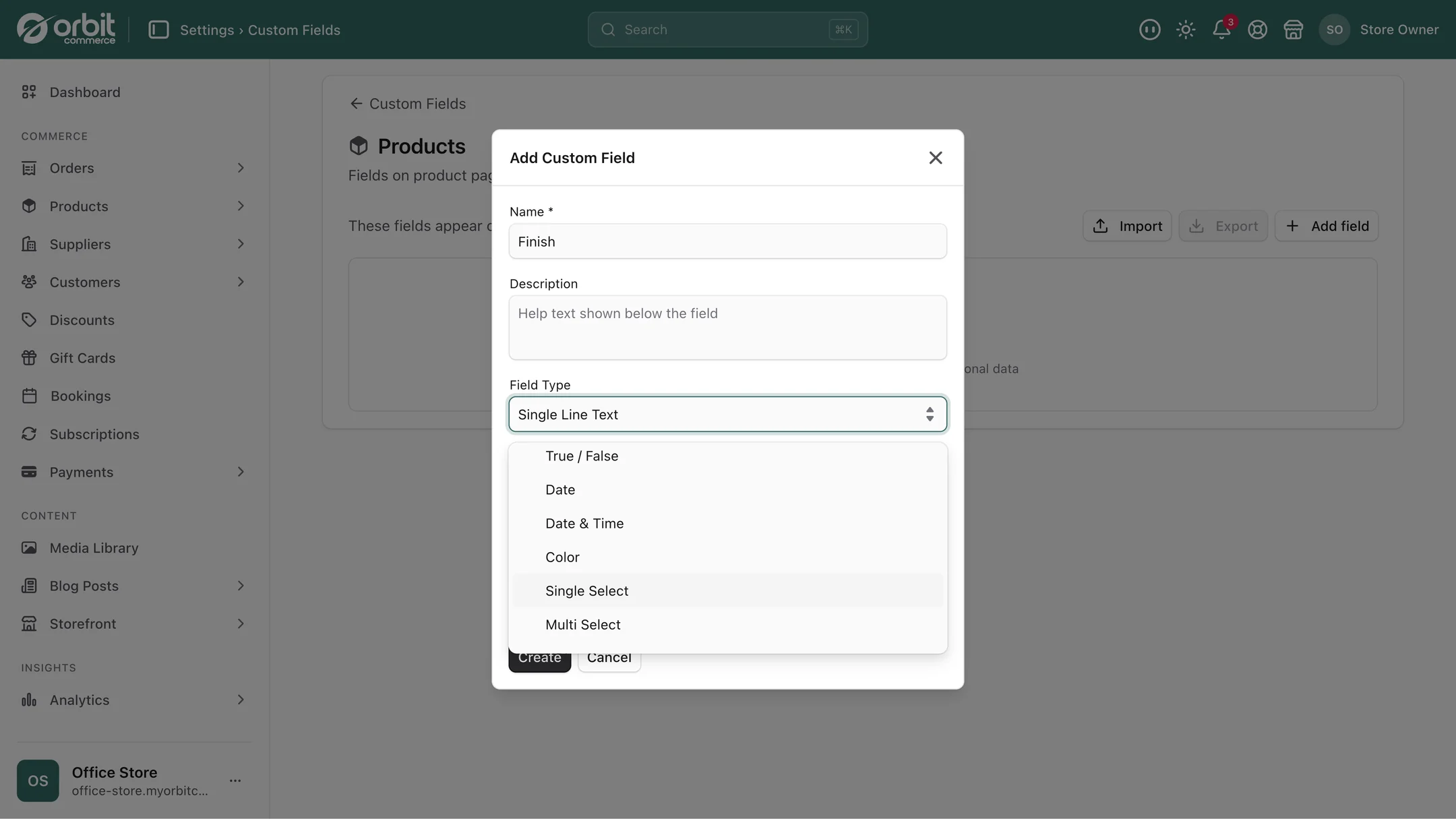
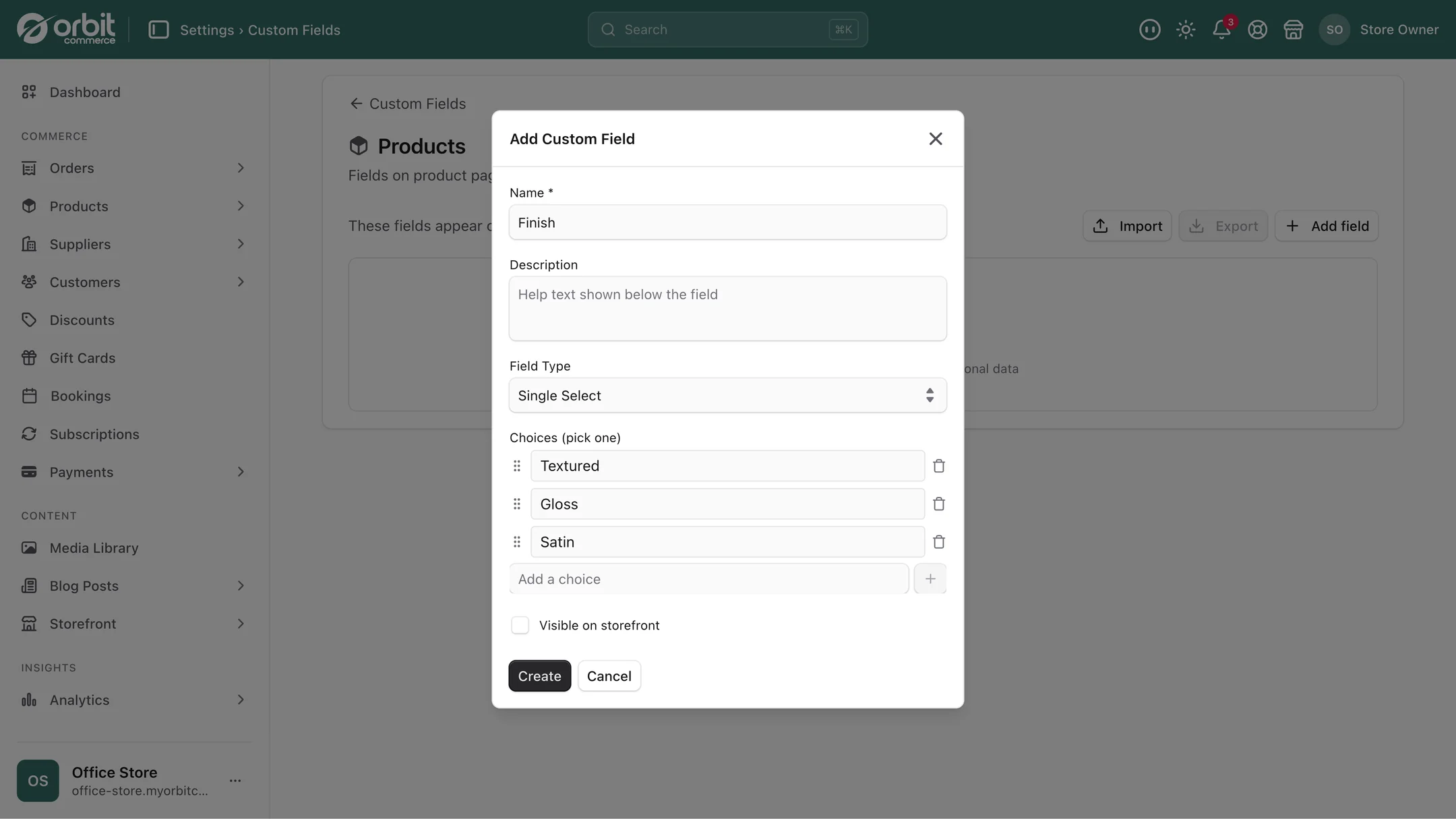
The "pick one from a list" option deserves special mention, because it quietly solves the biggest data problem small shops have. If scent family is a free text box, you will end up with "Citrus", "citrus", "Citrusy" and "Lemon / citrus" across your catalogue, and none of them will group together. If it is a list you defined, there is one spelling forever.
Rules that stop bad data getting in
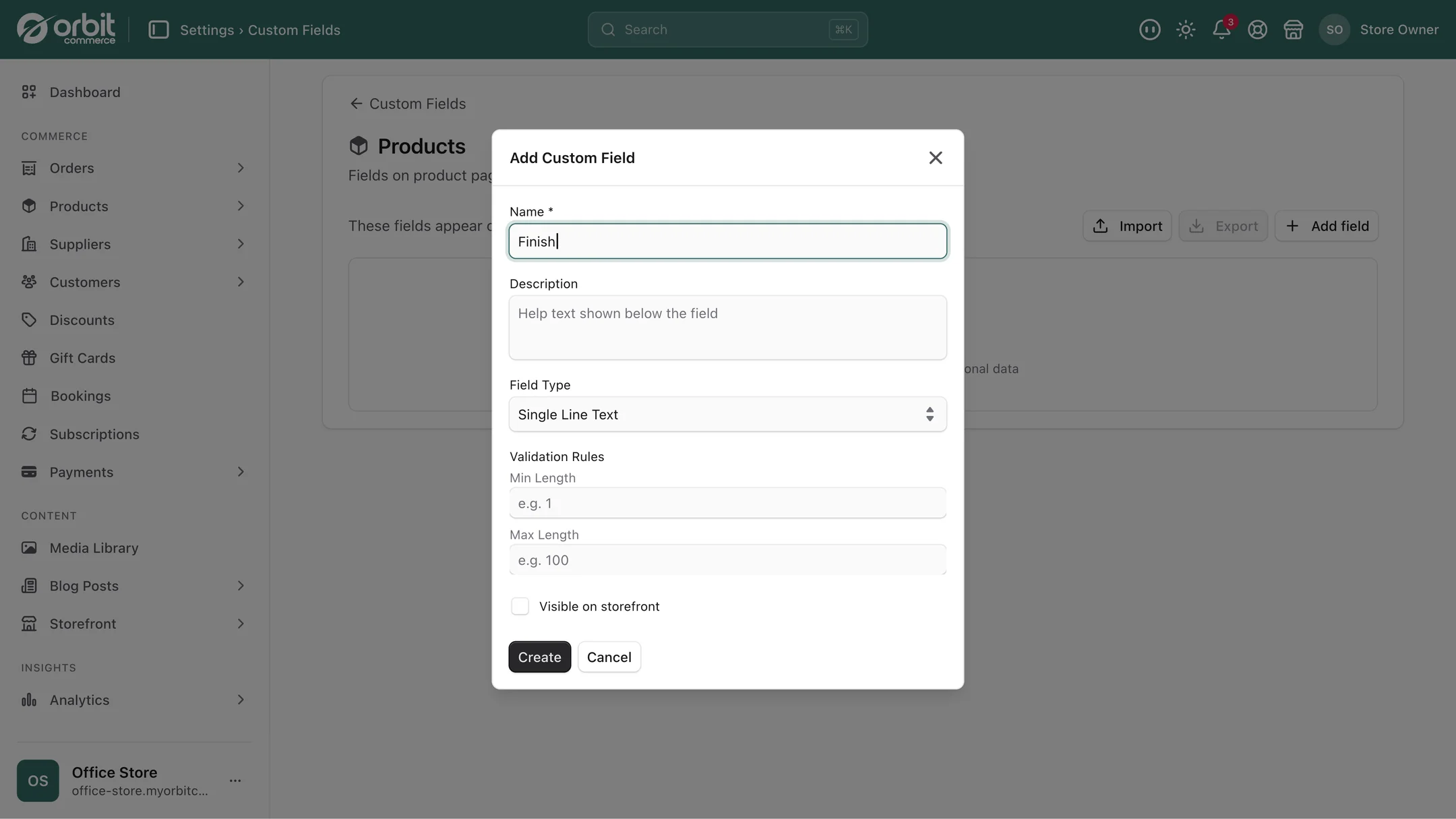
Each box can carry rules, and which rules you get depends on the kind of box. A number field takes a minimum and a maximum, so nobody types a burn time of 4,000 hours by leaving a finger on the zero, and a decimal field can be capped to two places. A text box takes a minimum and maximum length. A date field takes an earliest and a latest. A web address can be restricted to particular sites, which is how you stop a certificate link pointing anywhere but your certifier. A rating field takes a top and bottom of its scale.
This sounds fussy until the first time a member of staff adds 30 products in an afternoon and every one of them is right.
What shops actually do with them
A candle maker adds burn time, wax type and scent family. Scent family is a pick-one list. Now the shop can show a proper specification table on every product, and shoppers browsing for something fresh are not reading four paragraphs to find out.
A food producer adds allergens as a pick-several list and best before as a date. The allergen information is now structured rather than sitting in prose, which matters when the rules are strict and the consequences of getting it wrong are real. Our guide to selling food online in the UK covers the labelling side.
A furniture shop adds assembled dimensions, flat-pack dimensions and a yes-or-no field for "needs two people". That last one prevents a specific and expensive kind of complaint.
A jeweller adds metal, stone, hallmark year and a file field holding the certificate. When a customer emails asking what their ring is made of, the answer is on the order, not in somebody's memory.
A shop taking personalised orders puts a custom field on the order rather than the product: engraving text, gift message, delivery date requested. It arrives attached to the order, so whoever is packing sees it without opening an email thread.
A wholesaler puts a trade account number and agreed payment terms on the customer record, so anyone in the team can see the arrangement without asking. That pairs naturally with company accounts and trade pricing.
Showing them on your shop, or keeping them private
Every field has a switch that decides whether it shows on your storefront or stays internal. That distinction is more useful than it sounds.
Burn time and allergens should be public: they help people buy. Supplier name, cost price, the reorder code and the note saying "this one is slow, do not reorder" should not be. Both live in the same tidy system, and only the ones you choose are visible to customers.
To show a public field on the product page, place the Custom Field element with the page builder wherever the detail helps people buy, with its label above the value, beside it or left off.
Setting them up
- In your dashboard settings, go to custom fields and choose what the field is being added to: products, orders, customers and so on.
- Give it a name people will understand when they see it in the editor. "Burn time (hours)" beats "burn_time".
- Choose the kind of box. If the answer should always be one of a set list, use pick-one rather than text. You will thank yourself later.
- Add any rules the field type offers: minimum, maximum, length, allowed sites.
- Decide whether it shows on the storefront.
- Save, then open any product and the new box is there waiting.
If you already have this information in a spreadsheet, you can bring it in rather than retyping it, using the same bulk editing approach described in our guide to stock and inventory.
Questions people ask about custom fields
What is a custom field in an online shop?
It is an extra box you add yourself to products, orders or customers, so your shop can store the details that matter to your business but do not fit the standard fields. A candle shop might add burn time and scent family, a food producer allergens and best-before date. Because the information is stored properly rather than buried in a description, it can be shown in a table, filtered on, used in rules, and updated in bulk.
Can I use custom fields on orders and customers, not just products?
Yes. Custom fields can be attached to products, individual variants, categories, brands, orders, draft orders, customers, pages and blog posts. Orders are a particularly useful one, because gift messages, engraving text and requested delivery dates belong with the order rather than the product, and they then travel to whoever is packing it.
Do custom fields show on my shop, or are they private?
You choose, per field. Each one has a storefront visibility switch. Turn it on for information that helps people buy, such as ingredients, dimensions or care instructions. Leave it off for internal notes such as supplier, cost price or reorder codes. Both kinds live in the same system, and only the fields you have made visible reach customers.
Will custom fields stop my team typing things inconsistently?
That is largely what they are for. Use a pick-one or pick-several list rather than a free text box for anything with a fixed set of answers, and there is only ever one spelling of "citrus" in your catalogue. Set minimum and maximum values on the number fields as well, so obvious typing errors get caught at the point of entry rather than on a product page three months later.
The short version
If you keep a spreadsheet next to your shop because the shop cannot hold something important, that is a custom field waiting to happen. Add the boxes your business actually needs, use lists rather than free text wherever the answer is one of a known set, put sensible minimums and maximums on the numbers, and decide field by field what customers see. It takes an afternoon once and saves the same afternoon every month afterwards.
What this saves you buying
On most platforms the things above arrive as separate paid apps. On Orbit they are part of the plan.
| What you would otherwise buy | The cost elsewhere |
|---|---|
| A metafields or custom-fields app | a monthly bill on top of your plan |
| A product options or personalisation app | another monthly bill |
| The spreadsheet you keep alongside your shop | an hour a week, forever |